See it in action
Navigate S3 just like a standard directory. We provide a convenient ~/s3 path to work with. All the standard commands work, and there's no need for the AWS CLI.
Coco Alemana comes with built-in, native connectivity to Amazon S3. Two-way sync, Finder and Terminal support comes out of the box – all included in your Coco Alemana Pro subscription.
Navigate S3 just like a standard directory. We provide a convenient ~/s3 path to work with. All the standard commands work, and there's no need for the AWS CLI.
Using Apple's secure system APIs, we intercept and make requests to S3 on your behalf. This allows for a system-wide experience like no other – even when Coco Alemana isn't open.
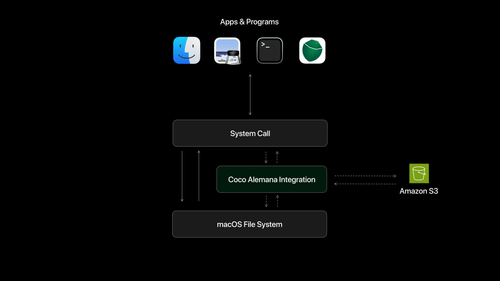
No pip install, complex build scripts or brew install required. Amazon S3 support works out of the box within Coco Alemana, and is updated when you update the main app.
Our integration works even if Coco Alemana is closed. It turns on when you start your computer, and is heavily managed by the core operating system, so it feels native.
This integration is not available for free. We offer a 14-day free trial, but subscription to our Pro plan is required for continued use. However, our Pro plan is free for university students and faculty.
Your AWS credentials are encrypted locally, and only used when a request needs to be made. You can manage your IAM permissions to prevent accidental actions via Finder as well.
Yes! You can access public buckets, or cross-account buckets by clicking an s3:// URL. The bucket will be registered, and you'll be able to navigate in Finder like any other bucket.
You can still read and write files to S3 locally, with full interactivity. Once you reconnect to the internet, your changes will be uploaded automatically. So yes, you can do data science on a plane, or during Coachella – The world is your oyster.